> ## Documentation Index
> Fetch the complete documentation index at: https://www.plain.com/docs/llms.txt
> Use this file to discover all available pages before exploring further.
# Interacting in discussions
> Let users talk to your agent in Ask Sidekick, receive their messages as webhooks, and reply through the API.
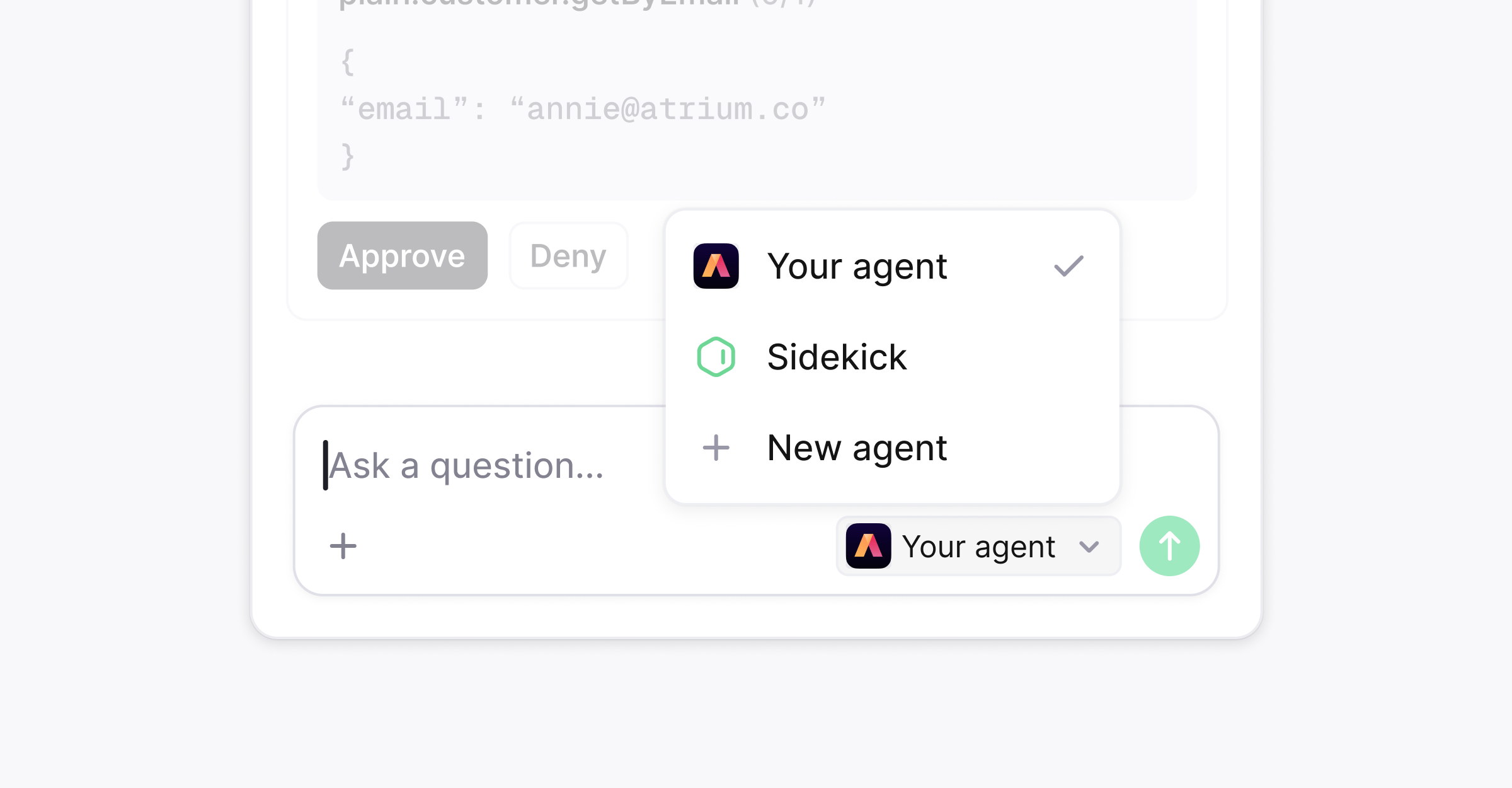 A discussion is where users talk to your agent inside Plain. Any user can click **Ask Sidekick** from any page, pick your agent, and send a message.
Plain sends you a webhook, and your agent replies through the API. Discussions are completely internal and not visible to your customers.
A discussion can be attached to a thread or be standalone. When a user starts a discussion from a thread, the webhook payload will include `discussion.threadId` to tell you which thread the discussion is linked to.
Discussions can also be started from a [workflow](/docs/product/agents/sidekick/in-workflows). In the workflow builder you can pick your agent as well.
## High-level flow
1. A user starts a discussion with your agent.
2. Plain sends [`discussion.message_created`](/docs/webhooks/discussion-message-created) to your webhook target.
3. Your agent sets the discussion status to `IN_PROGRESS`, does its work, posts a reply, and sets `IDLE`.
4. Your agent can then log its tool calls as well as ask for a user's approval. See [tool calls](/docs/agents/tool-calls) for more info.
## Permissions
For working with discussions, your machine user's API key must have the following permissions:
* `threadDiscussion:read` and `threadDiscussion:edit` to read discussions, report status, request approvals, resolve or reopen discussions
* `threadDiscussionMessage:create` and `threadDiscussionMessage:edit` to post messages to the discussion
* `thread:read` and `customer:read` if the agent needs to read the linked thread
## Webhooks
Subscribe your [webhook target](/docs/webhooks) to these events:
| Event | When | Needed |
| ---------------------------------------------------------------------------------------------- | -------------------------------------- | ---------------------------------------------- |
| [`discussion.message_created`](/docs/webhooks/discussion-message-created) | A message was posted in any discussion | Always |
| [`discussion.tool_call_approval_resolved`](/docs/webhooks/discussion-tool-call-approval-resolved) | A user approved or denied a tool call | If you ask for approvals |
| [`discussion.turn_stop_requested`](/docs/webhooks/discussion-turn-stop-requested) | A user asked your agent to stop | If you can stop mid-turn |
| [`discussion.discussion_created`](/docs/webhooks/discussion-created) | A discussion was started | Optional. The first message is enough to start |
| [`discussion.tool_call_approval_requested`](/docs/webhooks/discussion-tool-call-approval-requested) | Echo of an approval you requested | Optional |
## Decide whether to answer
`discussion.message_created` fires for every discussion in the workspace, including your own replies. Answer only when all of these are true:
| Condition | Why |
| ------------------------------------------ | -------------------------------------------------------------------- |
| `discussion.type` is `AGENT_SESSION` | Other types are Slack and email discussions between people. |
| `discussion.agent.id` is your machine user | Otherwise it is Sidekick or another agent. |
| `message.type` is `OUTBOUND` | A user's message is `OUTBOUND`. Your replies come back as `INBOUND`. |
| `discussion.status` is not `RESOLVED` | Otherwise the discussion is over. |
Load your machine user once at startup and deduplicate on `message.id`:
```ts theme={null}
import { PlainClient } from "@team-plain/graphql";
const plain = new PlainClient({ apiKey: process.env.PLAIN_API_KEY! });
const me = await plain.query.myMachineUser();
function shouldAnswer(payload: DiscussionMessageCreatedPublicEventPayload) {
return (
payload.discussion.type === "AGENT_SESSION" &&
payload.discussion.agent?.id === me.id &&
payload.message.type === "OUTBOUND" &&
payload.discussion.status !== "RESOLVED"
);
}
```
In the webhook payload, `message.markdown` is what the user wrote. `message.workspaceFiles` lists any files they attached. You must respond with a status code of `200` before your agent starts work so that Plain doesn't retry the webhook delivery.
## Replying
You can use the `sendDiscussionMessage` mutation to reply to the discussion using markdown. This also marks the discussion as having unread messages within the Plain app.
## Updating the discussion status
Set the discussion's agent status to `IN_PROGRESS` when a turn starts and `IDLE` when it ends. If the turn fails, post the error as a message first, then set `IDLE`.
Asking for a tool call approval will automatically update the discussion status to `TOOL_CALL_APPROVAL_PENDING`.
When a discussion is pending a tool call approval, you cannot change its status manually.
## Stop when asked
A user can stop your agent mid-turn. Plain sends [`discussion.turn_stop_requested`](/docs/webhooks/discussion-turn-stop-requested) with the `discussion` to stop. Cancel the model call, post what you have if useful, and set the discussion status to `IDLE`. The discussion stays open for the next message.
## Resolve the discussion
You can use `changeThreadDiscussionStatus` to resolve a discussion when the user needs nothing further, or set the status to `OPEN` to reopen it.
## Replying to customers on behalf of the user
A user in a discussion can ask your agent to message the customer. The agent can do this by calling the [`replyToThread`](/docs/graphql/messaging/reply-to-thread) mutation.
By default the reply is from the machine user. To send it as the user who asked, add them to the API key's **impersonation allow list** and pass `impersonation.asUser`. See [reply as a user](/docs/graphql/messaging/reply-to-thread#reply-as-a-user).
The allow list belongs to the API key, not the machine user. Open the API key from the machine user's page and, under **Impersonation**, add who it may reply as:
* individual team members
* everyone holding a built-in role: Owner, Admin, or Support
* everyone holding a custom role
A discussion is where users talk to your agent inside Plain. Any user can click **Ask Sidekick** from any page, pick your agent, and send a message.
Plain sends you a webhook, and your agent replies through the API. Discussions are completely internal and not visible to your customers.
A discussion can be attached to a thread or be standalone. When a user starts a discussion from a thread, the webhook payload will include `discussion.threadId` to tell you which thread the discussion is linked to.
Discussions can also be started from a [workflow](/docs/product/agents/sidekick/in-workflows). In the workflow builder you can pick your agent as well.
## High-level flow
1. A user starts a discussion with your agent.
2. Plain sends [`discussion.message_created`](/docs/webhooks/discussion-message-created) to your webhook target.
3. Your agent sets the discussion status to `IN_PROGRESS`, does its work, posts a reply, and sets `IDLE`.
4. Your agent can then log its tool calls as well as ask for a user's approval. See [tool calls](/docs/agents/tool-calls) for more info.
## Permissions
For working with discussions, your machine user's API key must have the following permissions:
* `threadDiscussion:read` and `threadDiscussion:edit` to read discussions, report status, request approvals, resolve or reopen discussions
* `threadDiscussionMessage:create` and `threadDiscussionMessage:edit` to post messages to the discussion
* `thread:read` and `customer:read` if the agent needs to read the linked thread
## Webhooks
Subscribe your [webhook target](/docs/webhooks) to these events:
| Event | When | Needed |
| ---------------------------------------------------------------------------------------------- | -------------------------------------- | ---------------------------------------------- |
| [`discussion.message_created`](/docs/webhooks/discussion-message-created) | A message was posted in any discussion | Always |
| [`discussion.tool_call_approval_resolved`](/docs/webhooks/discussion-tool-call-approval-resolved) | A user approved or denied a tool call | If you ask for approvals |
| [`discussion.turn_stop_requested`](/docs/webhooks/discussion-turn-stop-requested) | A user asked your agent to stop | If you can stop mid-turn |
| [`discussion.discussion_created`](/docs/webhooks/discussion-created) | A discussion was started | Optional. The first message is enough to start |
| [`discussion.tool_call_approval_requested`](/docs/webhooks/discussion-tool-call-approval-requested) | Echo of an approval you requested | Optional |
## Decide whether to answer
`discussion.message_created` fires for every discussion in the workspace, including your own replies. Answer only when all of these are true:
| Condition | Why |
| ------------------------------------------ | -------------------------------------------------------------------- |
| `discussion.type` is `AGENT_SESSION` | Other types are Slack and email discussions between people. |
| `discussion.agent.id` is your machine user | Otherwise it is Sidekick or another agent. |
| `message.type` is `OUTBOUND` | A user's message is `OUTBOUND`. Your replies come back as `INBOUND`. |
| `discussion.status` is not `RESOLVED` | Otherwise the discussion is over. |
Load your machine user once at startup and deduplicate on `message.id`:
```ts theme={null}
import { PlainClient } from "@team-plain/graphql";
const plain = new PlainClient({ apiKey: process.env.PLAIN_API_KEY! });
const me = await plain.query.myMachineUser();
function shouldAnswer(payload: DiscussionMessageCreatedPublicEventPayload) {
return (
payload.discussion.type === "AGENT_SESSION" &&
payload.discussion.agent?.id === me.id &&
payload.message.type === "OUTBOUND" &&
payload.discussion.status !== "RESOLVED"
);
}
```
In the webhook payload, `message.markdown` is what the user wrote. `message.workspaceFiles` lists any files they attached. You must respond with a status code of `200` before your agent starts work so that Plain doesn't retry the webhook delivery.
## Replying
You can use the `sendDiscussionMessage` mutation to reply to the discussion using markdown. This also marks the discussion as having unread messages within the Plain app.
## Updating the discussion status
Set the discussion's agent status to `IN_PROGRESS` when a turn starts and `IDLE` when it ends. If the turn fails, post the error as a message first, then set `IDLE`.
Asking for a tool call approval will automatically update the discussion status to `TOOL_CALL_APPROVAL_PENDING`.
When a discussion is pending a tool call approval, you cannot change its status manually.
## Stop when asked
A user can stop your agent mid-turn. Plain sends [`discussion.turn_stop_requested`](/docs/webhooks/discussion-turn-stop-requested) with the `discussion` to stop. Cancel the model call, post what you have if useful, and set the discussion status to `IDLE`. The discussion stays open for the next message.
## Resolve the discussion
You can use `changeThreadDiscussionStatus` to resolve a discussion when the user needs nothing further, or set the status to `OPEN` to reopen it.
## Replying to customers on behalf of the user
A user in a discussion can ask your agent to message the customer. The agent can do this by calling the [`replyToThread`](/docs/graphql/messaging/reply-to-thread) mutation.
By default the reply is from the machine user. To send it as the user who asked, add them to the API key's **impersonation allow list** and pass `impersonation.asUser`. See [reply as a user](/docs/graphql/messaging/reply-to-thread#reply-as-a-user).
The allow list belongs to the API key, not the machine user. Open the API key from the machine user's page and, under **Impersonation**, add who it may reply as:
* individual team members
* everyone holding a built-in role: Owner, Admin, or Support
* everyone holding a custom role