> ## Documentation Index
> Fetch the complete documentation index at: https://www.plain.com/docs/llms.txt
> Use this file to discover all available pages before exploring further.
# Shadow mode
> Watch how Ari would answer without it replying to any customer.
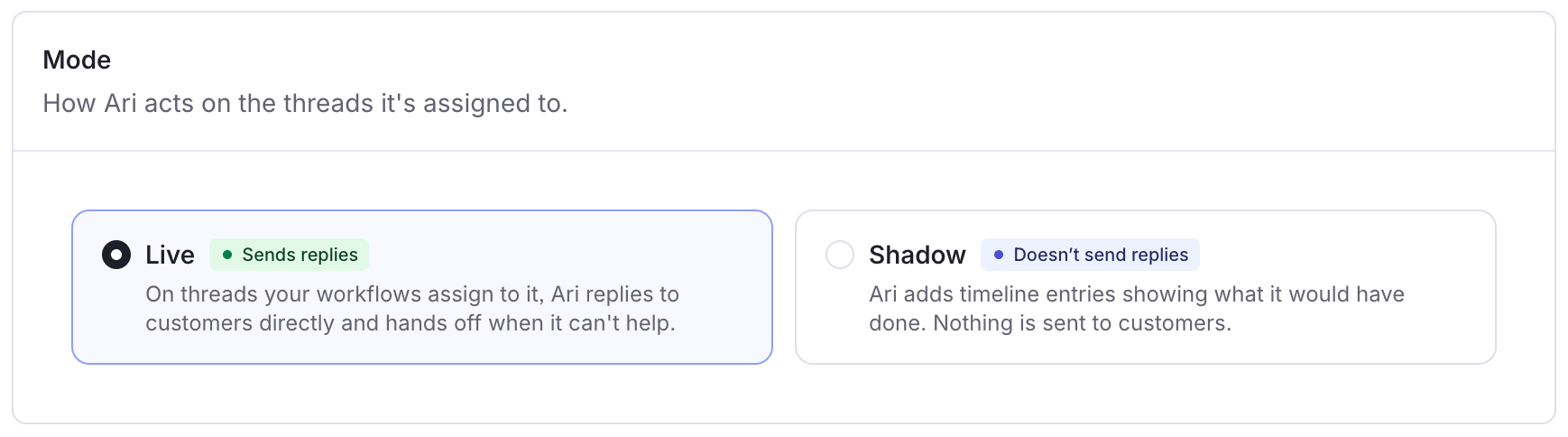
Shadow mode lets you see how Ari would handle your support before it replies to any customer.
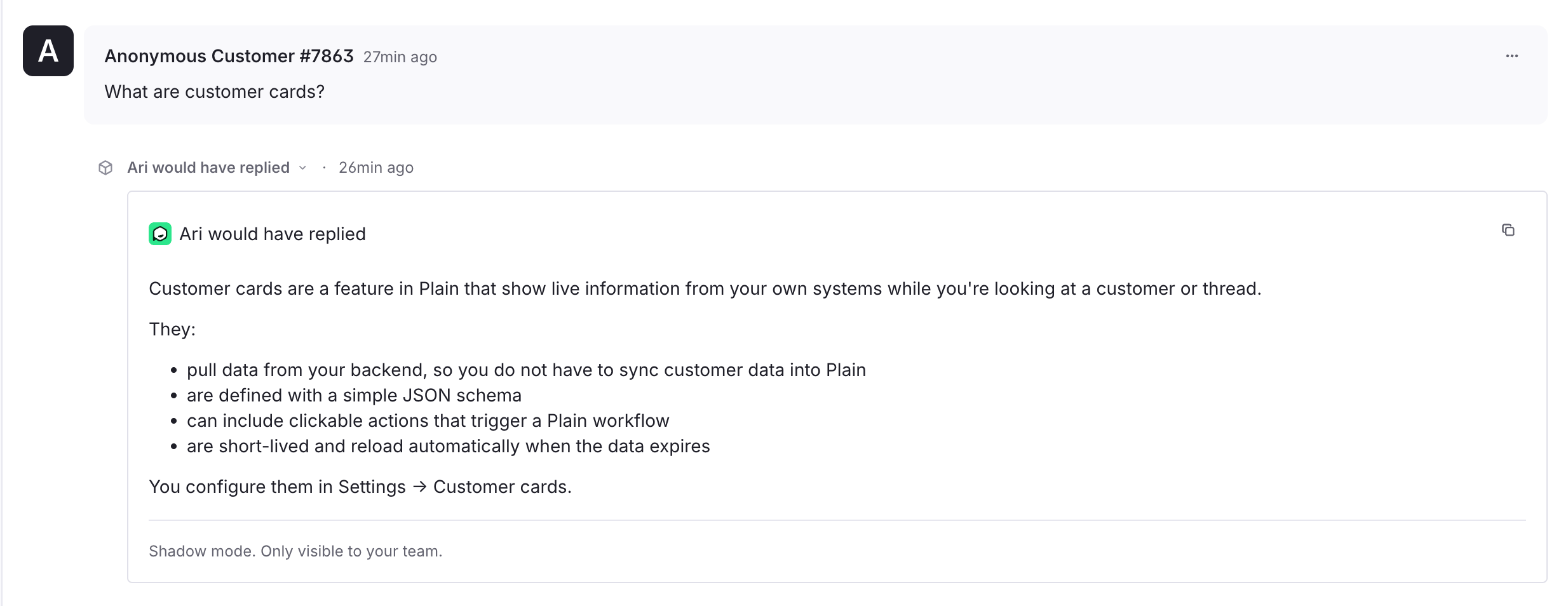
Ari runs on your real threads but sends nothing. Instead it adds a timeline entry showing what it would have done: the reply it would have sent, or why it would have handed off to your team.
Your team keeps handling every conversation the same way they do now. Ari doesn't message the customer or change the thread, and customers never see these entires from Ari. This lets you check Ari's behavior, and build trust, on your own threads without affecting the customer experience.
New AI agents start in shadow mode. Ari only starts replying to customers once you take it live.
## What you'll see
While Shadow mode is on, Ari adds private timeline entries when new customer messages are added to thread. Each entry says one of:
1. **Would have replied** → The draft answer Ari would have sent
2. **Would have handed off** → When Ari would have passed the thread to your team, and why
3. **No response needed** → Ari decided nothing needed a reply
These entries are internal, so customers never see them.
Once Ari would have handed a thread off to your team, it stops adding entries to that thread, the same as when Ari is operating in live mode.
 ## Which threads Ari shadows
Ari shadows the same threads it would work on when live. A thread comes to Ari in one of two ways:
* **Automatically via workflows**
* The assignment workflow you set up for Ari decide which threads it picks up, so you can limit Shadow mode to specific tiers, labels, or channels
* If no workflow assigns threads to Ari, Shadow mode has nothing to watch
* **Manually**
* You can assign Ari to any thread yourself to see how it would handle that specific conversation
Either way, Ari runs alongside your team without interfering with your assignments.
It's added as an additional assignee rather than taking the thread over, so your queues, workflows, and assignment rules stay intact and whoever was already handling the thread keeps handling it.
## Enabling shadow mode
You switch between Shadow mode and live on the [Plain AI → Ari → Preferences](https://app.plain.com/~/ai/ari/preferences/) page.
When you're happy with Ari's drafts, turn Shadow mode off there to take it live. Ari then replies to customers on the threads assigned to it.
## Which threads Ari shadows
Ari shadows the same threads it would work on when live. A thread comes to Ari in one of two ways:
* **Automatically via workflows**
* The assignment workflow you set up for Ari decide which threads it picks up, so you can limit Shadow mode to specific tiers, labels, or channels
* If no workflow assigns threads to Ari, Shadow mode has nothing to watch
* **Manually**
* You can assign Ari to any thread yourself to see how it would handle that specific conversation
Either way, Ari runs alongside your team without interfering with your assignments.
It's added as an additional assignee rather than taking the thread over, so your queues, workflows, and assignment rules stay intact and whoever was already handling the thread keeps handling it.
## Enabling shadow mode
You switch between Shadow mode and live on the [Plain AI → Ari → Preferences](https://app.plain.com/~/ai/ari/preferences/) page.
When you're happy with Ari's drafts, turn Shadow mode off there to take it live. Ari then replies to customers on the threads assigned to it.
 ## Reading via GQL
In shadow mode Ari writes its outcome to the thread's timeline as a [Thread Event](/docs/graphql/events). Read it like any other timeline entry, filtering to events:
```graphql theme={null}
query ($threadId: ID!) {
thread(threadId: $threadId) {
timelineEntries(filters: { entryTypes: [THREAD_EVENT] }, first: 50) {
edges { node { entry { ... on ThreadEventEntry {
externalId
title
components { ... on ComponentContainer { containerContent {
... on ComponentText { text }
} } }
} } } }
}
}
}
```
Shadow mode events are identified by their `externalId`, which starts with `ari-dry-run`.
When Ari would have answered, the drafted reply is the `ComponentText` inside the event's `ComponentContainer`.
## Reading via GQL
In shadow mode Ari writes its outcome to the thread's timeline as a [Thread Event](/docs/graphql/events). Read it like any other timeline entry, filtering to events:
```graphql theme={null}
query ($threadId: ID!) {
thread(threadId: $threadId) {
timelineEntries(filters: { entryTypes: [THREAD_EVENT] }, first: 50) {
edges { node { entry { ... on ThreadEventEntry {
externalId
title
components { ... on ComponentContainer { containerContent {
... on ComponentText { text }
} } }
} } } }
}
}
}
```
Shadow mode events are identified by their `externalId`, which starts with `ari-dry-run`.
When Ari would have answered, the drafted reply is the `ComponentText` inside the event's `ComponentContainer`.