> ## Documentation Index
> Fetch the complete documentation index at: https://www.plain.com/docs/llms.txt
> Use this file to discover all available pages before exploring further.
# Knowledge gaps
> See the questions Ari could not answer, and fill the gaps in your knowledge with Sidekick.
A knowledge gap is a question customers ask that your [knowledge sources](/docs/product/agents/knowledge-sources) don't answer. When [Ari](/docs/product/agents/ari) can't answer, Plain records the question, groups repeat questions into one gap, and raises a [task](/docs/product/platform/tasks) so your team knows what to document next. Gaps live under [**Ari → Knowledge → Knowledge gaps**](https://app.plain.com/~/ai/knowledge-gaps).
 Knowledge gaps are in beta. The behavior described here, and the API behind it, may change without a deprecation period.
## How a gap is detected
1. **Ari can't answer.** Ari searches your knowledge sources for an answer to the customer's message. If it can't find one it trusts, it [hands the thread to your team](/docs/product/agents/ari/handoffs) and records a signal. Other handoffs, such as a customer asking for a human or a billing question, don't record a signal.
2. **Plain checks it's a real gap.** Only general product questions your docs should answer become gaps. Requests for Ari to act, questions about a customer's own account, and topics outside your product are dropped.
3. **Plain groups it.** The question joins an existing gap that covers the same topic, or opens a new one with a generated title and description. One gap per missing topic, however many customers ask.
4. **Plain raises a task.** A new gap creates one unassigned task, titled **Knowledge gap: …**. Later threads with the same question link to that task and update the gap's **Last seen** time.
## Reviewing gaps
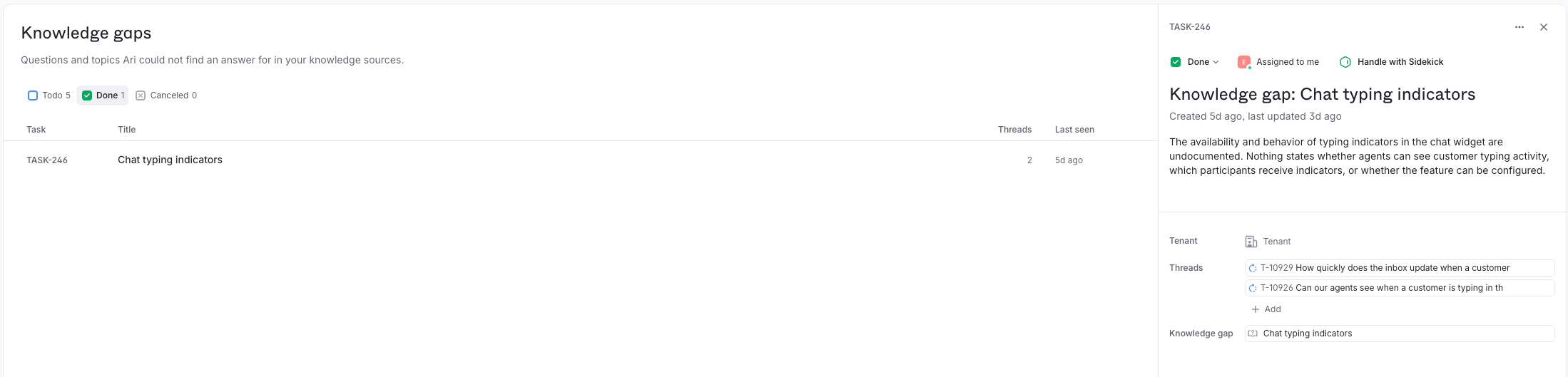
Go to [**Ari → Knowledge → Knowledge gaps**](https://app.plain.com/~/ai/knowledge-gaps). The list shows each gap's task, title, number of threads, and when it was last seen, sorted by thread count so the most common questions come first. Switch between **Todo**, **Done**, and **Cancelled** to see open, filled, and dismissed gaps. A gap's status is its task's status: mark the task done to close the gap, and Plain reopens it if the same question comes back.
Click a gap to see its description, its task, and the threads where customers asked it. Reading 2 or 3 of those threads tells you how customers phrase the question, which is what the article needs to answer.
The task also appears on the [Tasks](/docs/product/platform/tasks) page and under **Tasks** in each linked thread's sidebar. Open the task and the gap is shown under **Knowledge gap**.
## Filling a gap with Sidekick
Sidekick ships with a built-in [skill](/docs/product/agents/sidekick/skills), **/fill-knowledge-gap**, that researches a gap and drafts the missing article. To start it:
* Open the gap's task and click **Handle with Sidekick**
* Type **/fill-knowledge-gap** in any Sidekick session, then name the gap or task, or paste the gap's link
Sidekick checks in with you at each decision:
Sidekick reads the gap and its linked threads, searches your knowledge sources and existing Help Center articles, and finds similar past threads to see how your team answered before. If you've connected a documentation tool to Sidekick, such as Notion or a custom MCP server for your docs platform, it reads that too when your Plain knowledge doesn't settle the answer. It strips customer details from everything it reads and never fetches arbitrary web pages. See [Tools and integrations](/docs/product/agents/sidekick/integrations) for what you can connect.
Sidekick writes a new standalone article, 200 to 300 words, followed by a **Sources used** list so you can check every claim. If the evidence is thin or contradictory, it asks you for the missing facts.
Sidekick asks whether to save the draft. If you agree, it picks a Help Center (preferring a private or internal one) and an article group, shows you the proposed write, and waits for your approval. It saves the article as a **Draft** for you to review and publish. It always creates a new article and never edits an existing one.
Sidekick offers to mark the gap's task done. Say yes and the gap moves to **Done**.
The session stays open after the skill finishes, so you can keep working with Sidekick:
* **Refine the draft.** Ask for a different tone, a shorter version, a code example, or a version for a different audience.
* **Pull in more context.** If you've connected integrations or [custom MCP servers](/docs/product/agents/sidekick/integrations#custom-mcp-servers), ask Sidekick to check them: your internal docs, an engineering runbook, the source code, or product analytics. It folds what it finds into the draft.
* **Save it outside Plain.** If your docs live in Notion, Mintlify, ReadMe, or another connected tool, ask Sidekick to write the page there. The gap becomes a page in your real docs without leaving the session, and Ari indexes it through your [knowledge sources](/docs/product/agents/knowledge-sources) on the next reindex. Writes to connected tools follow the usual [approval rules](/docs/product/agents/sidekick/actions-and-approvals).
* **Reply to the customers who asked.** Ask Sidekick to draft replies to the threads that raised the gap, now that the answer exists.
## API and webhooks
Everything on this page is available over the API:
* [Knowledge gaps API](/docs/graphql/knowledge-gaps): list gaps sorted by thread count or recency, filter by status, and read the task behind each one
* [Tasks API](/docs/graphql/tasks): a task raised for a gap has a `sourceLinks` entry with `sourceType: "knowledge_gap"`, which points at the gap
* [Task webhooks](/docs/webhooks/task-created): subscribe to task created, updated, and status transitioned events to react when Ari raises or your team closes a gap
Knowledge gaps are in beta. The behavior described here, and the API behind it, may change without a deprecation period.
## How a gap is detected
1. **Ari can't answer.** Ari searches your knowledge sources for an answer to the customer's message. If it can't find one it trusts, it [hands the thread to your team](/docs/product/agents/ari/handoffs) and records a signal. Other handoffs, such as a customer asking for a human or a billing question, don't record a signal.
2. **Plain checks it's a real gap.** Only general product questions your docs should answer become gaps. Requests for Ari to act, questions about a customer's own account, and topics outside your product are dropped.
3. **Plain groups it.** The question joins an existing gap that covers the same topic, or opens a new one with a generated title and description. One gap per missing topic, however many customers ask.
4. **Plain raises a task.** A new gap creates one unassigned task, titled **Knowledge gap: …**. Later threads with the same question link to that task and update the gap's **Last seen** time.
## Reviewing gaps
Go to [**Ari → Knowledge → Knowledge gaps**](https://app.plain.com/~/ai/knowledge-gaps). The list shows each gap's task, title, number of threads, and when it was last seen, sorted by thread count so the most common questions come first. Switch between **Todo**, **Done**, and **Cancelled** to see open, filled, and dismissed gaps. A gap's status is its task's status: mark the task done to close the gap, and Plain reopens it if the same question comes back.
Click a gap to see its description, its task, and the threads where customers asked it. Reading 2 or 3 of those threads tells you how customers phrase the question, which is what the article needs to answer.
The task also appears on the [Tasks](/docs/product/platform/tasks) page and under **Tasks** in each linked thread's sidebar. Open the task and the gap is shown under **Knowledge gap**.
## Filling a gap with Sidekick
Sidekick ships with a built-in [skill](/docs/product/agents/sidekick/skills), **/fill-knowledge-gap**, that researches a gap and drafts the missing article. To start it:
* Open the gap's task and click **Handle with Sidekick**
* Type **/fill-knowledge-gap** in any Sidekick session, then name the gap or task, or paste the gap's link
Sidekick checks in with you at each decision:
Sidekick reads the gap and its linked threads, searches your knowledge sources and existing Help Center articles, and finds similar past threads to see how your team answered before. If you've connected a documentation tool to Sidekick, such as Notion or a custom MCP server for your docs platform, it reads that too when your Plain knowledge doesn't settle the answer. It strips customer details from everything it reads and never fetches arbitrary web pages. See [Tools and integrations](/docs/product/agents/sidekick/integrations) for what you can connect.
Sidekick writes a new standalone article, 200 to 300 words, followed by a **Sources used** list so you can check every claim. If the evidence is thin or contradictory, it asks you for the missing facts.
Sidekick asks whether to save the draft. If you agree, it picks a Help Center (preferring a private or internal one) and an article group, shows you the proposed write, and waits for your approval. It saves the article as a **Draft** for you to review and publish. It always creates a new article and never edits an existing one.
Sidekick offers to mark the gap's task done. Say yes and the gap moves to **Done**.
The session stays open after the skill finishes, so you can keep working with Sidekick:
* **Refine the draft.** Ask for a different tone, a shorter version, a code example, or a version for a different audience.
* **Pull in more context.** If you've connected integrations or [custom MCP servers](/docs/product/agents/sidekick/integrations#custom-mcp-servers), ask Sidekick to check them: your internal docs, an engineering runbook, the source code, or product analytics. It folds what it finds into the draft.
* **Save it outside Plain.** If your docs live in Notion, Mintlify, ReadMe, or another connected tool, ask Sidekick to write the page there. The gap becomes a page in your real docs without leaving the session, and Ari indexes it through your [knowledge sources](/docs/product/agents/knowledge-sources) on the next reindex. Writes to connected tools follow the usual [approval rules](/docs/product/agents/sidekick/actions-and-approvals).
* **Reply to the customers who asked.** Ask Sidekick to draft replies to the threads that raised the gap, now that the answer exists.
## API and webhooks
Everything on this page is available over the API:
* [Knowledge gaps API](/docs/graphql/knowledge-gaps): list gaps sorted by thread count or recency, filter by status, and read the task behind each one
* [Tasks API](/docs/graphql/tasks): a task raised for a gap has a `sourceLinks` entry with `sourceType: "knowledge_gap"`, which points at the gap
* [Task webhooks](/docs/webhooks/task-created): subscribe to task created, updated, and status transitioned events to react when Ari raises or your team closes a gap