> ## Documentation Index
> Fetch the complete documentation index at: https://www.plain.com/docs/llms.txt
> Use this file to discover all available pages before exploring further.
# Actions and approvals
> Let Sidekick act in Plain and your connected tools, with approval rules you control.
Sidekick can take real actions in Plain and in your connected tools: assign a thread, add a label, create a Linear issue, post a Slack message, update a HubSpot record. Some actions run immediately; anything higher-stakes or hard to reverse waits for your explicit approval first.
 ## How approvals work
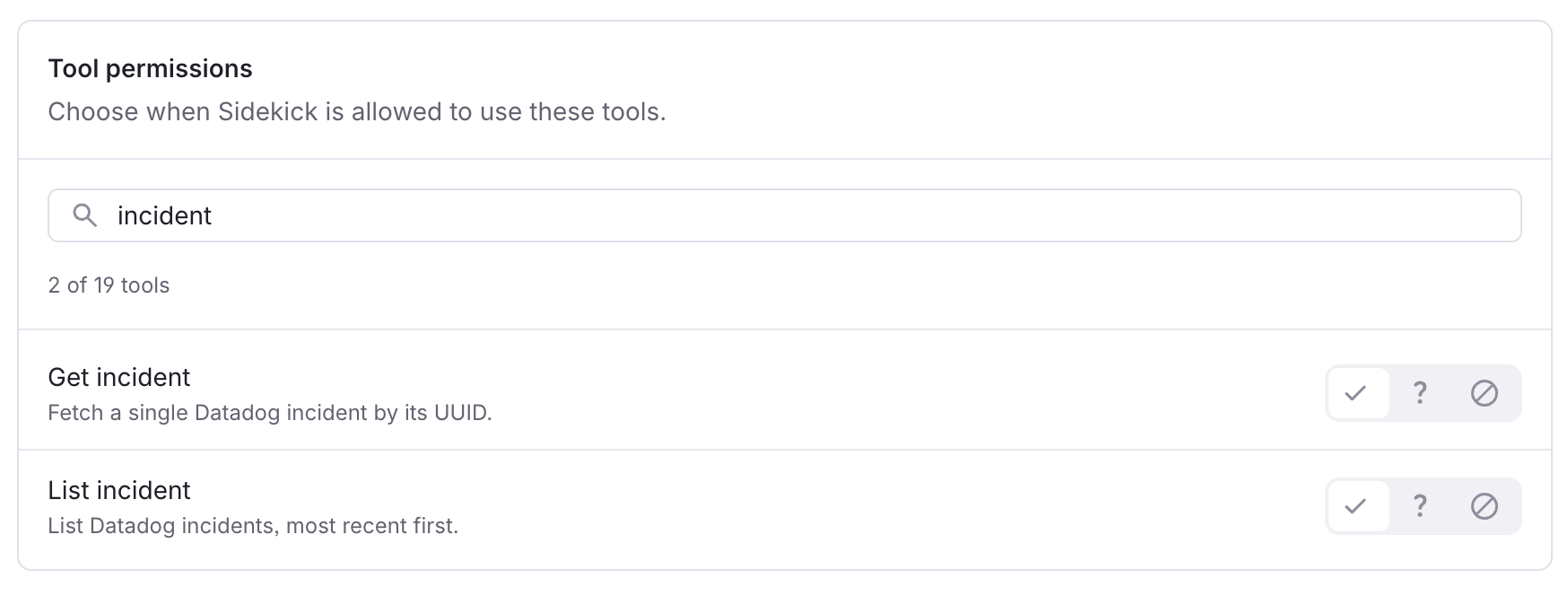
Every action Sidekick can take is classified as either **runs directly** or **requires approval**, based on how reversible and how high-impact it is.
When an action requires approval:
1. You ask Sidekick to do something
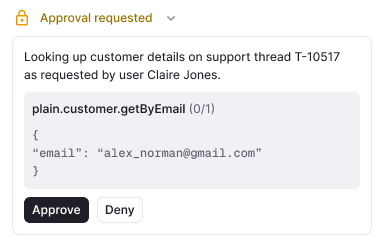
2. Sidekick presents the proposed action with **confirm** and **deny** controls
3. You approve or deny
4. If you approve, Sidekick carries it out and reports the outcome back in the conversation. If you deny, it stops and you can redirect.
## How approvals work
Every action Sidekick can take is classified as either **runs directly** or **requires approval**, based on how reversible and how high-impact it is.
When an action requires approval:
1. You ask Sidekick to do something
2. Sidekick presents the proposed action with **confirm** and **deny** controls
3. You approve or deny
4. If you approve, Sidekick carries it out and reports the outcome back in the conversation. If you deny, it stops and you can redirect.
 Sidekick never takes an irreversible action on its own. It proposes, drafts, and prepares, and you stay in control of anything that matters.
You can also approve or deny requests from Slack, without switching to Plain, if Sidekick in Slack is enabled.
## Actions in Plain
### Run directly
These lower-impact actions execute immediately:
* Assign or unassign a thread
* Add or remove labels
* Change a thread's priority
* Rename a thread
* Set or update thread fields
* Add an internal note (visible to your team only, never to the customer)
* Link a thread to a Linear or Jira issue
* Draft, update, or publish Help Center articles
### Require approval
These higher-impact or harder-to-reverse actions show a confirm step first:
* Change a thread's status (for example, marking it done)
* Escalate a thread
* Merge two threads
* Lock a thread
* Mark a customer as spam
* Change a company or tenant's tier
## Actions in connected tools
What Sidekick can do in each tool depends on the integration and the scopes it was connected with. Some tools may need re-authorisation with write permissions before actions are available.
| **Integration** | **Runs directly** | **Requires approval** |
| ------------------------------------- | -------------------------------------------------- | ----------------------------------------------------------------------- |
| **Linear** | Add a comment; link a Plain thread to an issue | Create or update an issue; change an issue's state |
| **Jira** | Add a comment | Create or update an issue (assignee, labels, priority, status) |
| [**incident.io**](http://incident.io) | Create an action item | Create an incident |
| **Sentry** | Add a comment | Update an issue (resolve, ignore, or assign) |
| **Notion** | Add a comment | Create, update, or move a page; create or update a database |
| **HubSpot** | Create a note or task | Create a ticket; update a record; create an association between records |
| **Attio** | Create a note, task, or comment | Update a record; move it to a different pipeline stage |
| **Slack** | Post or update a message; add or remove a reaction | None |
Observability integrations (Datadog, Grafana, Sentry, PostHog, LaunchDarkly) are read-only. Sidekick reads from them but cannot change anything in them.
## Examples
**Escalate to engineering.** Ask Sidekick to escalate a thread and it creates a linked Linear or Jira issue, pre-filled with context from the thread, the logs, and the error data, then waits for your approval before creating it.
**Investigate an error.** Ask *"trace this error"* and Sidekick searches your logs and spans, cross-references Sentry, reads the alert channel in Slack, and names the likely root cause. Reading is always automatic; only the follow-up write actions ask for approval.
Sidekick never takes an irreversible action on its own. It proposes, drafts, and prepares, and you stay in control of anything that matters.
You can also approve or deny requests from Slack, without switching to Plain, if Sidekick in Slack is enabled.
## Actions in Plain
### Run directly
These lower-impact actions execute immediately:
* Assign or unassign a thread
* Add or remove labels
* Change a thread's priority
* Rename a thread
* Set or update thread fields
* Add an internal note (visible to your team only, never to the customer)
* Link a thread to a Linear or Jira issue
* Draft, update, or publish Help Center articles
### Require approval
These higher-impact or harder-to-reverse actions show a confirm step first:
* Change a thread's status (for example, marking it done)
* Escalate a thread
* Merge two threads
* Lock a thread
* Mark a customer as spam
* Change a company or tenant's tier
## Actions in connected tools
What Sidekick can do in each tool depends on the integration and the scopes it was connected with. Some tools may need re-authorisation with write permissions before actions are available.
| **Integration** | **Runs directly** | **Requires approval** |
| ------------------------------------- | -------------------------------------------------- | ----------------------------------------------------------------------- |
| **Linear** | Add a comment; link a Plain thread to an issue | Create or update an issue; change an issue's state |
| **Jira** | Add a comment | Create or update an issue (assignee, labels, priority, status) |
| [**incident.io**](http://incident.io) | Create an action item | Create an incident |
| **Sentry** | Add a comment | Update an issue (resolve, ignore, or assign) |
| **Notion** | Add a comment | Create, update, or move a page; create or update a database |
| **HubSpot** | Create a note or task | Create a ticket; update a record; create an association between records |
| **Attio** | Create a note, task, or comment | Update a record; move it to a different pipeline stage |
| **Slack** | Post or update a message; add or remove a reaction | None |
Observability integrations (Datadog, Grafana, Sentry, PostHog, LaunchDarkly) are read-only. Sidekick reads from them but cannot change anything in them.
## Examples
**Escalate to engineering.** Ask Sidekick to escalate a thread and it creates a linked Linear or Jira issue, pre-filled with context from the thread, the logs, and the error data, then waits for your approval before creating it.
**Investigate an error.** Ask *"trace this error"* and Sidekick searches your logs and spans, cross-references Sentry, reads the alert channel in Slack, and names the likely root cause. Reading is always automatic; only the follow-up write actions ask for approval.