> ## Documentation Index
> Fetch the complete documentation index at: https://www.plain.com/docs/llms.txt
> Use this file to discover all available pages before exploring further.
# Tools & integrations
> Connect your tools to Sidekick and get context from Linear, GitHub, Datadog, Sentry, LaunchDarkly, Attio, HubSpot, Notion, and more, without leaving Plain.
Sidekick treats Plain's own data as home base and reaches outward through every connected integration. Instead of switching tabs to check Linear, GitHub, Datadog, or Notion, you ask Sidekick and it surfaces what's relevant, directly inside a conversation.
The more tools you connect, the more Sidekick can do. This article covers the catalog and how to connect it. For what Sidekick can *do* in these tools, and how approvals work, see **Actions and approvals.**
## How to connect an integration
You need to be a workspace **Admin** or **Owner** to connect integrations.
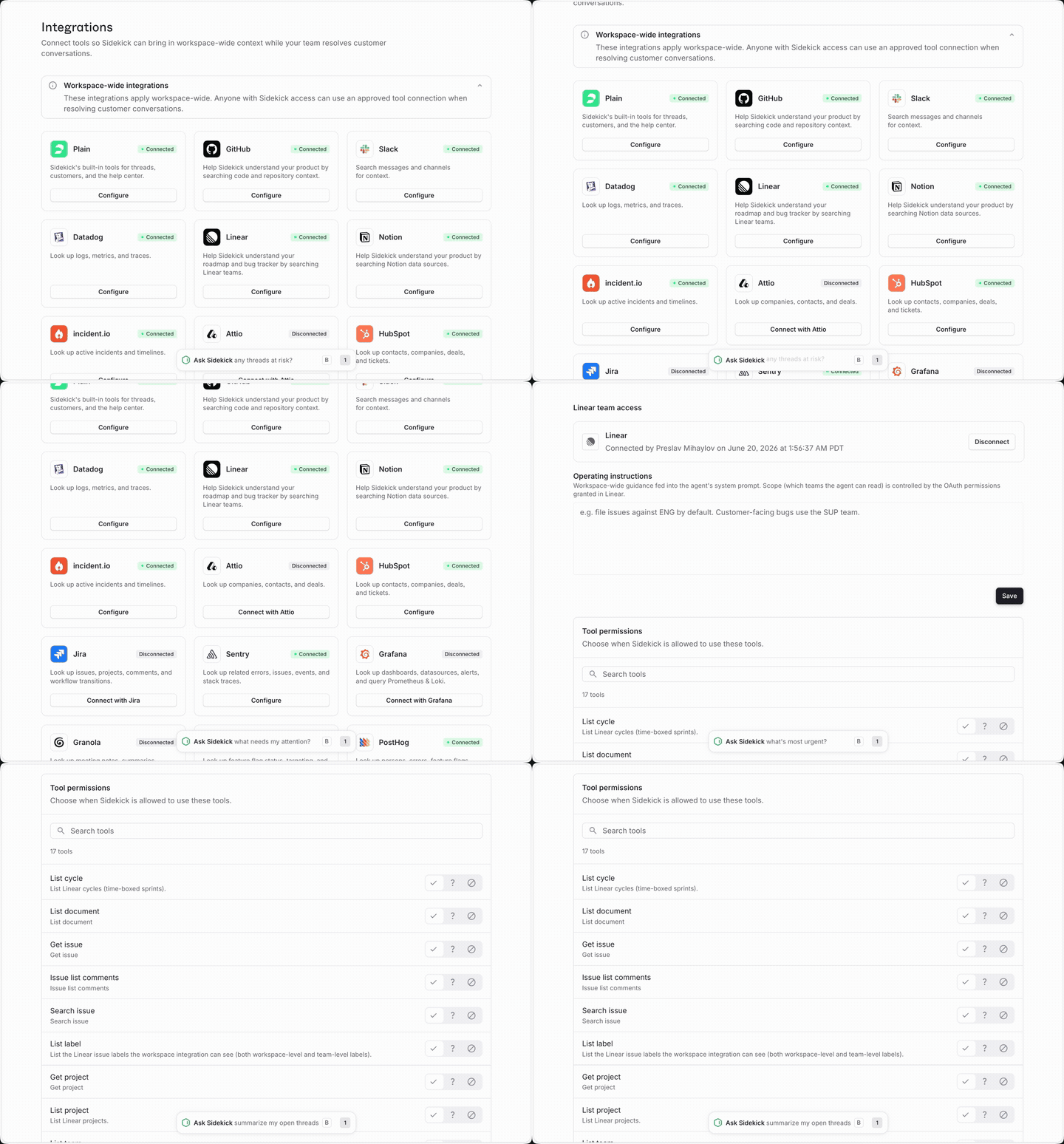
1. Go to **Plain AI → Sidekick → Integrations**
2. Find the integration you want and click **Connect**
3. Complete the authentication flow
4. Once connected, the integration is available to everyone in your workspace immediately
To disconnect, return to the same page and click **Disconnect**.
 ## How integrations work in a session
You don't configure anything per session. When you open Sidekick, it discovers which integrations your workspace has connected and uses them as needed. As it works, you can see its tool calls on screen in real time, so you always know what it looked up and why.
## Supported integrations
Every tool is opt-in and connected through **Sidekick → Integrations**. The catalog spans five categories, plus Slack, GitHub, and custom MCP servers.
### Knowledge and meetings
| **Integration** | **What Sidekick can look up** |
| --------------- | --------------------------------------------------------- |
| **Notion** | Search pages and databases for documentation and runbooks |
| **Granola** | AI meeting notes and summaries |
| **Grain** | Meeting recordings, transcripts, and call summaries |
### CRMs
| **Integration** | **What Sidekick can look up** |
| --------------- | ------------------------------------------------------------------------------------------------ |
| **HubSpot** | Contacts, companies, and deals; ticket status and pipeline stage; CRM activity and owner details |
| **Attio** | Company and contact records by email or domain; pipeline stages; account notes and tasks |
### Issues and incidents
| **Integration** | **What Sidekick can look up** |
| ------------------------------------- | --------------------------------------------------------------- |
| **Linear** | Search issues, look up status, find related projects and cycles |
| **Jira** | Search issues with JQL, look up issue details and comments |
| [**incident.io**](http://incident.io) | List active incidents, get incident details |
### Observability
| **Integration** | **What Sidekick can look up** |
| --------------- | -------------------------------------------------- |
| **Datadog** | Query metrics, logs, and monitor status |
| **Grafana** | Query dashboards and production signals |
| **Sentry** | Look up errors and exceptions, find related events |
### Analytics
| **Integration** | **What Sidekick can look up** |
| ---------------- | ------------------------------------------------------------------------------------------------------- |
| **PostHog** | Product events, session recordings, and user analytics; what a user has done in the product |
| **LaunchDarkly** | Feature flag status and targeting rules, rollout percentages, which variation is active per environment |
### Slack
| **Integration** | **What Sidekick can look up** |
| --------------- | ------------------------------------------- |
| **Slack** | Search channels and messages, look up users |
This Slack integration lets Sidekick look up Slack messages while you work in Plain.
It's separate from Sidekick in Slack, which lets your team @mention Plain inside a Slack channel.
You can enable each independently.
### Custom MCP servers
You can connect any internal tool to Sidekick through a custom MCP server, plugging your own systems into Sidekick's reach.
## How integrations work in a session
You don't configure anything per session. When you open Sidekick, it discovers which integrations your workspace has connected and uses them as needed. As it works, you can see its tool calls on screen in real time, so you always know what it looked up and why.
## Supported integrations
Every tool is opt-in and connected through **Sidekick → Integrations**. The catalog spans five categories, plus Slack, GitHub, and custom MCP servers.
### Knowledge and meetings
| **Integration** | **What Sidekick can look up** |
| --------------- | --------------------------------------------------------- |
| **Notion** | Search pages and databases for documentation and runbooks |
| **Granola** | AI meeting notes and summaries |
| **Grain** | Meeting recordings, transcripts, and call summaries |
### CRMs
| **Integration** | **What Sidekick can look up** |
| --------------- | ------------------------------------------------------------------------------------------------ |
| **HubSpot** | Contacts, companies, and deals; ticket status and pipeline stage; CRM activity and owner details |
| **Attio** | Company and contact records by email or domain; pipeline stages; account notes and tasks |
### Issues and incidents
| **Integration** | **What Sidekick can look up** |
| ------------------------------------- | --------------------------------------------------------------- |
| **Linear** | Search issues, look up status, find related projects and cycles |
| **Jira** | Search issues with JQL, look up issue details and comments |
| [**incident.io**](http://incident.io) | List active incidents, get incident details |
### Observability
| **Integration** | **What Sidekick can look up** |
| --------------- | -------------------------------------------------- |
| **Datadog** | Query metrics, logs, and monitor status |
| **Grafana** | Query dashboards and production signals |
| **Sentry** | Look up errors and exceptions, find related events |
### Analytics
| **Integration** | **What Sidekick can look up** |
| ---------------- | ------------------------------------------------------------------------------------------------------- |
| **PostHog** | Product events, session recordings, and user analytics; what a user has done in the product |
| **LaunchDarkly** | Feature flag status and targeting rules, rollout percentages, which variation is active per environment |
### Slack
| **Integration** | **What Sidekick can look up** |
| --------------- | ------------------------------------------- |
| **Slack** | Search channels and messages, look up users |
This Slack integration lets Sidekick look up Slack messages while you work in Plain.
It's separate from Sidekick in Slack, which lets your team @mention Plain inside a Slack channel.
You can enable each independently.
### Custom MCP servers
You can connect any internal tool to Sidekick through a custom MCP server, plugging your own systems into Sidekick's reach.