> ## Documentation Index
> Fetch the complete documentation index at: https://www.plain.com/docs/llms.txt
> Use this file to discover all available pages before exploring further.
# Tiers
> Segment customers into tiers with their own SLA targets, manually or automatically from a tenant field.
Tiers let you segment your customers, like **Enterprise**, **Pro**, or **Free**, so your team can deliver differentiated support with different SLA targets for each group.
Manage your tiers in **Settings → Tiers & SLAs**.
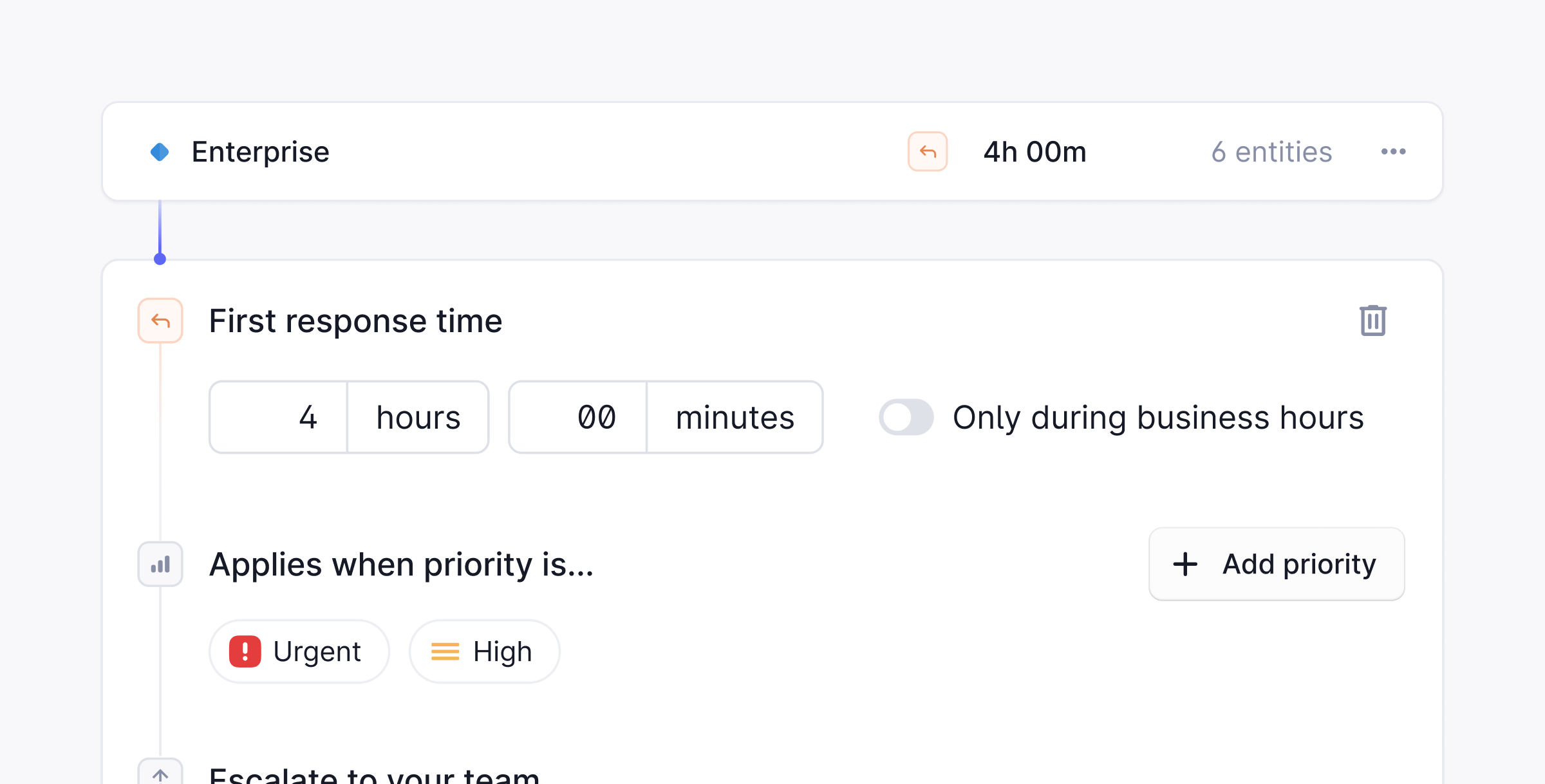 Tiers are available on the **Horizon pricing plan** and above.
## Assign a tier
Tiers can be assigned to **Companies** or **Tenants**. Once assigned, any thread from that company or tenant inherits the tier's SLA targets automatically.
To assign a tier:
Open the page for the company or tenant you want to put in a tier.
Click the **Tier** field in the sidebar and pick a tier from the list.
## SLAs per tier
Each tier has its own SLA configuration. Within a tier, you can set different response time targets per thread **priority**, so an Urgent thread from an Enterprise customer can have a tighter target than a Low priority thread from a Free customer.
You can learn more about SLAs in the [SLAs →](/docs/product/platform/slas) section of our documentation.
Tiers can also be assigned programmatically using [Plain's GraphQL API](/docs/graphql/tiers), so you can sync tier assignment with your billing system or CRM.
## Tier mapping
Tier mapping lets Plain automatically assign tenants to tiers based on the value of a tenant field. Rather than assigning tiers manually, you define which field drives tier assignment and Plain keeps every tenant's tier in sync as their field value changes.
### How it works
When you map a tenant field to tiers, Plain creates a tier for each option in that field. Every tenant is then assigned the tier that matches their current field value. If a tenant has no value for that field, they receive no tier assignment.
Machine tiers behave like any other tier: they can have SLA rules, a default thread priority, and can be used to filter your queue.
### Prerequisites
Only **single-select (dropdown) tenant fields** are eligible for tier mapping. Free-form text, number, boolean, and multi-select fields are not supported, because Plain needs a fixed, bounded set of values to create tiers from.
### Setting it up
Go to [**Settings → Tenant fields**](https://app.plain.com/~/settings/tenant-fields/) and find the **Tier mapping** card.
Select the field you want to map from the dropdown. Only eligible fields appear.
Click **Save**. Plain starts mapping tiers from that field.
Only one field can be mapped to tiers at a time.
#### What happens when you save
* Plain creates a new tier per option in the field, named after each option value
* All existing tenants with that field set are automatically assigned to their matching tier
* Tenants added or updated after setup are assigned in real time as their field value changes
### Keeping tiers in sync
Plain automatically keeps machine tiers in sync when the field schema changes:
* **New option added**: a new machine tier is created; any tenants with that value are assigned to it
* **Option removed**: the corresponding machine tier is deleted and affected tenants lose that tier assignment
* **Mapping removed or changed**: all machine tiers from the previous mapping are deleted and tenants are unassigned.
Changing the mapped field first removes the old mapping (including its tiers), then sets up the new one.
Tiers are available on the **Horizon pricing plan** and above.
## Assign a tier
Tiers can be assigned to **Companies** or **Tenants**. Once assigned, any thread from that company or tenant inherits the tier's SLA targets automatically.
To assign a tier:
Open the page for the company or tenant you want to put in a tier.
Click the **Tier** field in the sidebar and pick a tier from the list.
## SLAs per tier
Each tier has its own SLA configuration. Within a tier, you can set different response time targets per thread **priority**, so an Urgent thread from an Enterprise customer can have a tighter target than a Low priority thread from a Free customer.
You can learn more about SLAs in the [SLAs →](/docs/product/platform/slas) section of our documentation.
Tiers can also be assigned programmatically using [Plain's GraphQL API](/docs/graphql/tiers), so you can sync tier assignment with your billing system or CRM.
## Tier mapping
Tier mapping lets Plain automatically assign tenants to tiers based on the value of a tenant field. Rather than assigning tiers manually, you define which field drives tier assignment and Plain keeps every tenant's tier in sync as their field value changes.
### How it works
When you map a tenant field to tiers, Plain creates a tier for each option in that field. Every tenant is then assigned the tier that matches their current field value. If a tenant has no value for that field, they receive no tier assignment.
Machine tiers behave like any other tier: they can have SLA rules, a default thread priority, and can be used to filter your queue.
### Prerequisites
Only **single-select (dropdown) tenant fields** are eligible for tier mapping. Free-form text, number, boolean, and multi-select fields are not supported, because Plain needs a fixed, bounded set of values to create tiers from.
### Setting it up
Go to [**Settings → Tenant fields**](https://app.plain.com/~/settings/tenant-fields/) and find the **Tier mapping** card.
Select the field you want to map from the dropdown. Only eligible fields appear.
Click **Save**. Plain starts mapping tiers from that field.
Only one field can be mapped to tiers at a time.
#### What happens when you save
* Plain creates a new tier per option in the field, named after each option value
* All existing tenants with that field set are automatically assigned to their matching tier
* Tenants added or updated after setup are assigned in real time as their field value changes
### Keeping tiers in sync
Plain automatically keeps machine tiers in sync when the field schema changes:
* **New option added**: a new machine tier is created; any tenants with that value are assigned to it
* **Option removed**: the corresponding machine tier is deleted and affected tenants lose that tier assignment
* **Mapping removed or changed**: all machine tiers from the previous mapping are deleted and tenants are unassigned.
Changing the mapped field first removes the old mapping (including its tiers), then sets up the new one.