> ## Documentation Index
> Fetch the complete documentation index at: https://www.plain.com/docs/llms.txt
> Use this file to discover all available pages before exploring further.
# Follow up with inactive customers
> A worked workflow that chases a customer who has not replied, then closes the thread.
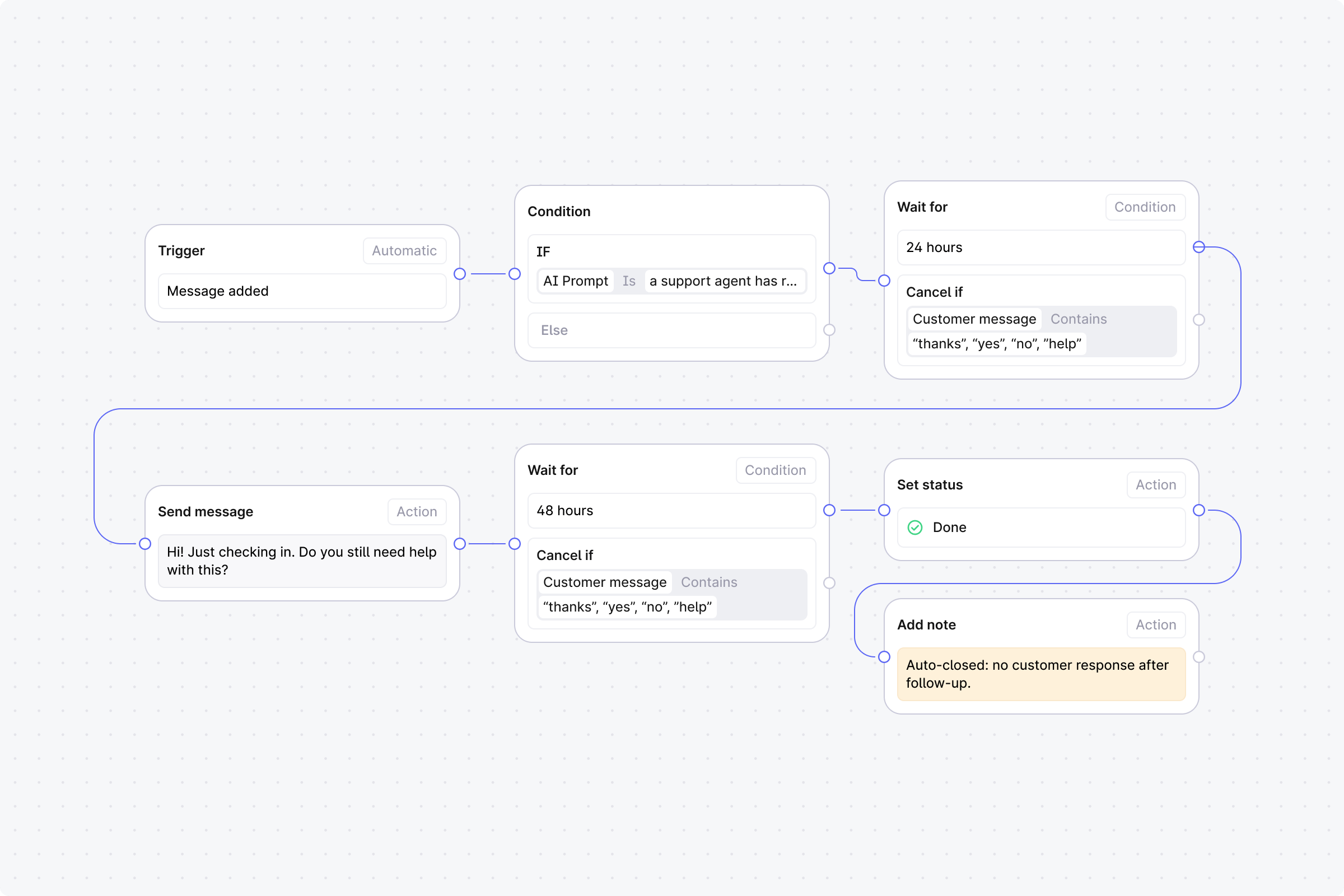
After your team replies, wait 24 hours. If the customer hasn't responded, send a follow-up. If still no response after 48 more hours, close the thread.
 ## Setup
1. **Trigger**: Set to **Automatic**, event: **Message added**.
2. **Step 1 (Condition)**: Use an **AI prompt match** with: "a support agent has replied to the customer". Or use **Any user message contains** with keywords.
* **No**: End the workflow.
* **Yes**: Continue.
3. **Step 2 (Wait)**: Duration: **24 hours**. Cancel condition: **Any customer message contains** common reply words (e.g. "thanks", "yes", "no", "help").
* **Canceled**: End the workflow. The customer replied.
* **Completed**: Continue.
4. **Step 3 (Action)**: **Send message**. Enter: "Checking in on this. Are you still seeing the problem?"
5. **Step 4 (Wait)**: Duration: **48 hours**. Same cancel condition as Step 2.
* **Canceled**: End the workflow. The customer replied.
* **Completed**: Continue.
6. **Step 5 (Action)**: **Set status** to **Done** (manually set).
7. **Step 6 (Action)**: **Add note**. Enter: "Auto-closed: no customer response after follow-up".
## Setup
1. **Trigger**: Set to **Automatic**, event: **Message added**.
2. **Step 1 (Condition)**: Use an **AI prompt match** with: "a support agent has replied to the customer". Or use **Any user message contains** with keywords.
* **No**: End the workflow.
* **Yes**: Continue.
3. **Step 2 (Wait)**: Duration: **24 hours**. Cancel condition: **Any customer message contains** common reply words (e.g. "thanks", "yes", "no", "help").
* **Canceled**: End the workflow. The customer replied.
* **Completed**: Continue.
4. **Step 3 (Action)**: **Send message**. Enter: "Checking in on this. Are you still seeing the problem?"
5. **Step 4 (Wait)**: Duration: **48 hours**. Same cancel condition as Step 2.
* **Canceled**: End the workflow. The customer replied.
* **Completed**: Continue.
6. **Step 5 (Action)**: **Set status** to **Done** (manually set).
7. **Step 6 (Action)**: **Add note**. Enter: "Auto-closed: no customer response after follow-up".