

Creating customers
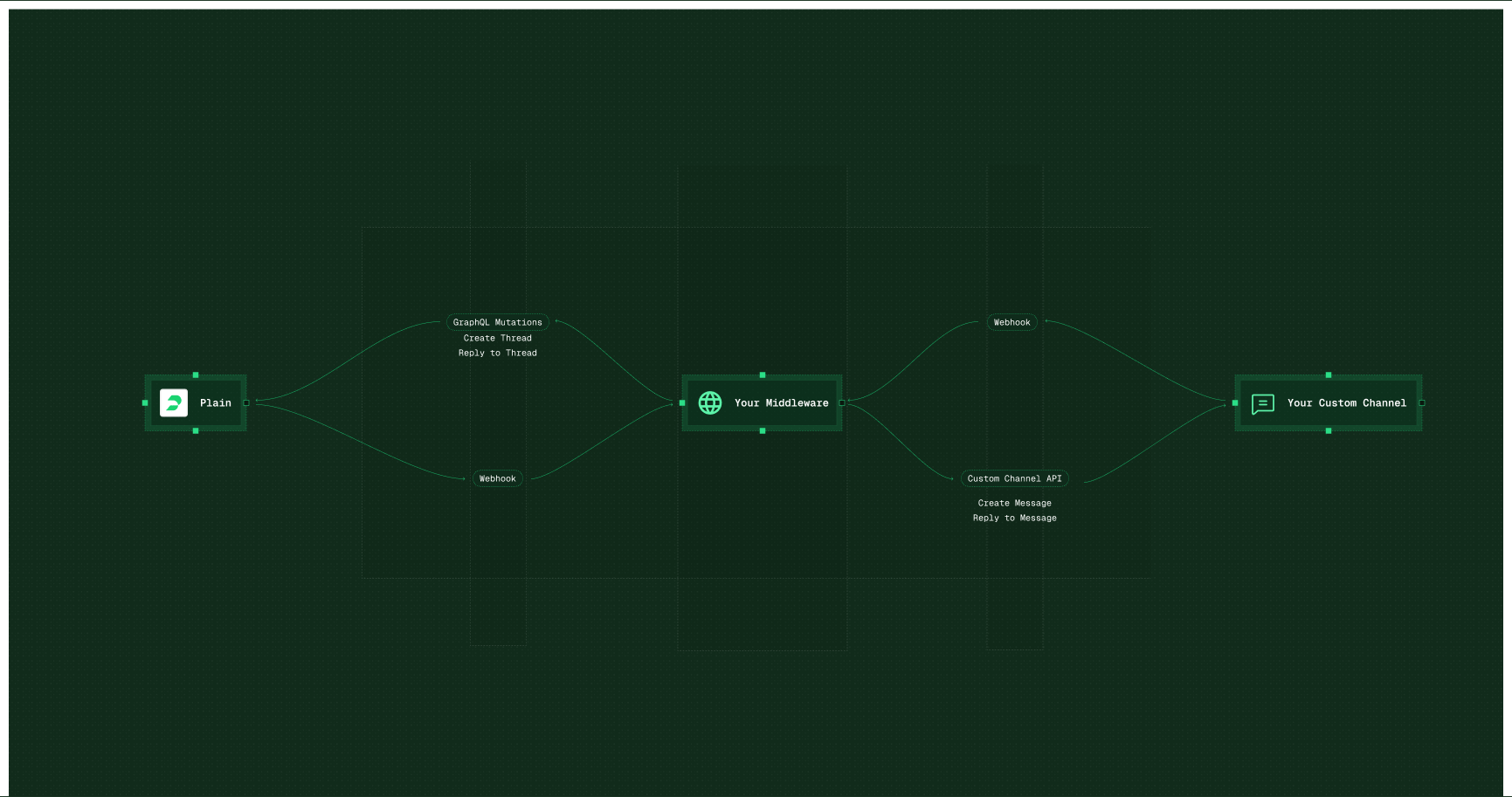
For every message to reach Plain, your middleware needs to create a customer when none exists, and match the existing one when it does. Plains customer object requires an email address.- Find out what identifiers are passed from your custom channel message received events
- Map relevant identifiers to Plain
- Make sure that the middleware tries to match existing customers first, and creates them as a fallback instead of by default.
Sending messages
- Messages created in Plain trigger a webhook
- Your middleware accepts that webhook
- Parse the required information out of it (message body, customerId, etc.)
- Then make a request to send that message into your new channel of choice
Receiving messages
Accepting messages from your custom channel and writing them into Plain works the exact same way, but in reverse.- You’ll need to accept messages from your custom channel, which is also done via webhooks (for example, with Whatsapp)
- Then your middleware will need to parse that message and use the Plain GraphQL API to create a new thread or create a new message in an existing thread.
Matching Plain message authors to your custom channel
-
In order to match up the author / person info from Plain → your new channel, we recommend querying Plain on startup of your middleware for all of your Plain workspace users and save out their
userIdandnameand along with else you might need.-
GraphQL
query users -
This is necessary because once you receive our webhook when a message in Plain has been created, threads.chat_sent, there will be a field like
payload.chat.createdBy.userIdcontaining the userId of whoever authored the message in Plain. You will then be able to look up that userId in the list of users you grabbed earlier to get their name / email / whatever in order to use them in your next step, creating the message payload you’ll send to your custom channel’s API to create the message there.
-
GraphQL
Matching messages from your custom channel to Plain threads
If your customers start conversations from your custom channel, you’ll need to make sure that you’re passing the custom channels customer identifier as a Customer externalID when upserting the customer. Which will need to be done before creating the thread. This is the customer’s identifier in the channel, like their WhatsApp userId. For example, if you identify customers in a channel like Whatsapp by their phone number. You would upsert the Customer with their phone number as their ExternalID, then create the thread in Plain passing in that external ID.Considerations
- Custom channels will not look like 1st party channels and do not come with all the native features of first party channels like Email or Slack.
- If you don’t have a way of pairing a customer with their real email address on creation, you need to add a temporary email address. Such as: channelidentifier@temp-yourcompany.com. If this is the case, use sendChat for replies instead of replyToThread.
- Custom channel threads appear under the “API” channel in the “channel” selector across the app, and in filters (Custom views, Insights.etc).
- You can’t set custom icons. So if you built a Whatsapp integration you wouldn’t be able to set a logo, or have a Whatsapp entry listed in any channel filtering and dropdowns.
- Use a label to always tag your custom channel’s threads when they’re created by your Middleware. That way you can filter / sort / report on your custom channel threads via that Label.
Examples:
Discourse
With Plain you can connect your Discourse community and automatically keep track of threads via Plain. This works by deploying a small node service which uses Plain and Discourse’s APIs. You can either self-host this little node service or we can deploy this for you. Check out the example on Github → This integration can be customized depending on the structure of your Discourse community and ideal support workflow. For example you could customize the priority, labels and assignee of threads from Discourse based on their category, author and content.Hubspot
This is now handled by the first-party HubSpot integration. It’s provided here only as an architecture example This integration automatically creates Hubspot tickets when threads are created in Plain.-
Receives
thread.thread_createdwebhook from Plain - Fetches thread details to get tenant ID
-
Fetches tenant details to get HubSpot company ID (
externalId) - Creates HubSpot ticket associated with the company
- Automatically refreshes HubSpot token if expired