

In discussions
Your machine user’s API key needs to have thethreadDiscussion:read and threadDiscussion:edit permissions.
Report a tool call
CallupsertDiscussionToolCall with a toolCallId you define.
The initial tool call should be in a status of PENDING. When your tool call completes, update the status to SUCCESS or ERROR depending on the outcome.
Plain shows the call in the discussion with its duration.
- SDK
- GraphQL
toolCallId: yours, unique within the discussion, 1–256 characters of[A-Za-z0-9_-]text: required on every write, max 2000 characters. This is what the user reads.error: required onERROR, max 4000 charactersSUCCESSandERRORare final. A later write returnsresult: NOOP.
Asking for approval
For a call that needs a user’s decision, you can call therequestDiscussionToolCallApproval mutation.
Plain shows a card with text as the heading, justification underneath, and Approve and Deny buttons.
The discussion’s agentStatus will automatically be set to TOOL_CALL_APPROVAL_PENDING.
- SDK
- GraphQL
PENDING.
Asking again for the same id returns the same approval. Several approvals can be open on one discussion at once.
Plain sends discussion.tool_call_approval_requested as an echo, then discussion.tool_call_approval_resolved when the user makes a decision:
APPROVED: means your tool call was approved and you can run the tool.DENIED: means the user rejected your tool call. Your tool will have already been updated to a status ofFAILEDand will include the user’sreviewerNoteif provided. This is a human-provided message as to why the tool call was rejected.- If your agent stops waiting, report
ERRORso the call doesn’t stay open.
Asking a question
When your agent needs a user to choose before it can carry on, call therequestDiscussionQuestion mutation.
Plain shows a card in the discussion with each question and its options. Plain always adds an Other box for a typed answer, so a user picks an option, types their own, or clicks Skip to dismiss the card.
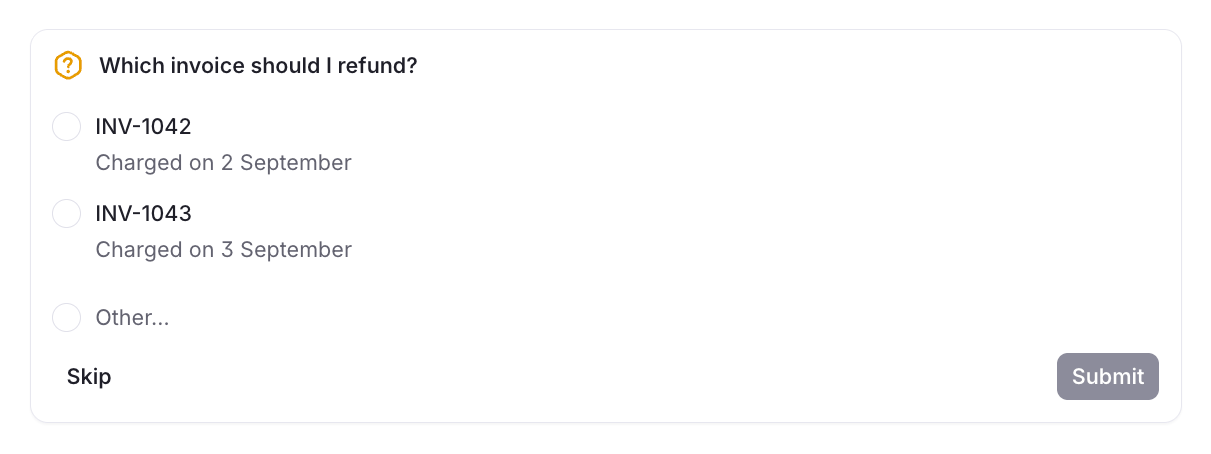
agentStatus will automatically be set to TOOL_CALL_APPROVAL_PENDING while the card is open.
- SDK
- GraphQL
questions: 1–4 per call. A card holds at most 8 across every ask.question: 1–500 characters. SetisMultiSelecttotrueto let the user pick more than one option.options: 2–4 per question.labelis 1–80 characters and unique within the question, anddescriptionis 1–240 characters. Put the option you recommend first, and don’t add your own Other option.- Asking while a card is open adds the new questions to that card, skipping any with the same text as one already on it. The response returns the whole card.
- Only the agent the discussion is bound to can ask, and not on a resolved discussion.
discussion.question_resolved when the user answers or dismisses the card:
ANSWERED:selectionsholds the option ids the user picked and anyotherTextthey typed. Plain sets the discussion toIN_PROGRESS, so carry on with the answer and setIDLEwhen the turn ends.DISMISSED: the user closed the card without answering, andselectionsis empty. Plain sets the discussion toIDLEunless a tool call is stillPENDING. Wait for the user’s next message.
On threads
On a thread there is no approval flow. You can record what the agent did by using thread events so you can see it on a thread’s timeline. The API key needsthreadEvent:create.
title is the line users see on the timeline. components hold the detail, built from UI components. Set isCollapsed to true so a run with many calls doesn’t crowd out the conversation. Pass an externalId if you want Plain to reject a duplicate tool call thread event.
If a tool on a thread needs a user’s decision, ask for it somewhere a user can answer: post a note that mentions them, or hand the thread off.