
What is MCP? A quick guide for support teams
All you need to know to connect your tools to AI
You've probably used an AI assistant at work by now. Maybe you've asked it to draft a customer reply, summarize a long thread, or help debug an issue. And you've noticed the gap: it doesn't know anything about your customers, your tickets, or your tools. So you copy-paste context from three different tabs, feed it into the AI, and hope for a useful answer.
MCP is the standard that's emerging to close that gap.
MCP stands for Model Context Protocol. It's an open standard that lets AI tools connect directly to the systems you already use. Your support platform, your CRM, your bug tracker, your knowledge base. Instead of you being the middleman between AI and your tools, MCP lets them talk to each other.
Think of it like USB-C for AI
Remember when every phone had a different charger? You'd open a drawer and find a tangle of cables, none of which fit your current device. USB-C fixed that by giving everything one standard port. It doesn't tell your phone what to do, it just defines how devices talk to each other.
MCP does the same thing for AI. It defines the interface between AI tools and external systems, not the behavior.
Without MCP, every AI tool needs a custom integration with every work app. If you have 5 AI tools and 10 apps you use daily, someone has to build and maintain 50 different connections. That's why most AI tools today work in isolation. The integration cost is too high.
With MCP, each work app builds one MCP server. Each AI tool supports MCP once. Now instead of 50 custom integrations, you need 15. The AI tool doesn't need to know anything specific about your support platform. It just speaks the same protocol.
MCP is an open standard, not owned by any single vendor. As of early 2026, ChatGPT, Gemini CLI, Amazon Q, Claude, GitHub Copilot, and Cursor either ship with MCP support or have well-maintained clients for it (support varies by product and edition). There are others too, but these give you a sense of how broadly it's been picked up.
What MCP lets AI tools do
The two things MCP actually does:
Take actions. The AI can do things on your behalf. Look up a customer, search your knowledge base, create a ticket, post a message. Instead of you going to your CRM to check account details and relaying that to the AI, the AI checks the CRM itself. (This is where you want approval steps before anything gets sent.)
Say a customer asks about their billing. The AI pulls up their account, sees they're on a trial that expires Mar 6, and drafts a response with the right details.
Pull in context. The AI can read from your systems. Ticket history, customer timelines, recent product changes, internal documentation. It sees what's relevant instead of you having to describe it. (This is where you want to think about what fields get redacted.)
You're handling an escalation. The AI reads the full thread history, the customer's previous conversations, and the related bug report, then gives you a summary of where things stand.
MCP also supports reusable prompt templates (like "summarize this thread" or "draft a reply in our voice"), though that's less about the protocol and more about how your AI tool is configured. Most teams get the biggest value from the first two.
What this means if you work in support
No more tab-juggling. Today, answering one customer question might mean checking the support platform, the CRM, the bug tracker, and the knowledge base. With MCP, your AI assistant pulls from all of these in one conversation.
AI agents that actually know your systems. Generic AI assistants give generic answers. An MCP-connected AI agent can check a real customer's actual account, look at their real ticket history, and find the specific knowledge base article that answers their question. The difference between "try clearing your cache" and "I see your account was migrated to the new plan yesterday and your API key needs to be regenerated, here's how" is context.
Your tools start working together. Most support teams run on 5-10 different tools that don't talk to each other well. MCP doesn't replace any of them. It connects them through AI. Your support platform, CRM, bug tracker, and internal docs all become accessible to the same AI assistant.
There are already MCP servers for Slack, GitHub, Linear, Sentry, Notion, Google Drive, databases, and support platforms including Plain. Some are official (maintained by the vendor), some are community-built. Quality and capabilities vary. Most are read-only; fewer offer write actions.
What MCP doesn't do. It doesn't replace your tools. It doesn't mean AI handles tickets autonomously. And it doesn't make bad AI models smarter. MCP just gives AI a way to connect to your systems. What the AI does with that access still depends on the model, the prompts, and the guardrails your team puts in place.
How people actually use MCPs today
You don't need to write code to use MCP.
You pick an AI tool that supports MCP (meaning it has a built-in MCP client that can connect to servers, either natively or through a plugin). ChatGPT, Cursor, Gemini, and dozens of others qualify. Then you tell it which systems to connect to. You're basically saying: "here's my support platform, here's my CRM, here's GitHub."
In most tools, this is a config file. You won't need to write code, but you will see something like this:
{
  "mcpServers": {
    "your-support-platform": { "url": "https://..." },
    "your-crm":              { "url": "https://..." },
    "github":                { "command": "npx", "args": ["@modelcontextprotocol/server-github"]
Each entry points to an MCP server. Some run remotely (a URL), some run locally on your machine (a command). You authenticate with each, and then the AI discovers what it can do. Most of the time you don't have to micromanage what it can do. You just ask questions and it picks the right tools.
Here's what that looks like in practice: a support engineer has three MCP servers configured. Their support platform, their CRM, and GitHub. A customer reports a bug. The AI pulls up the customer's account from the CRM, finds the related GitHub issue, and sees a fix was merged yesterday but hasn't been deployed yet.
The CRM server is slow to respond (it sometimes takes a few seconds for the lookup), and the GitHub server returns a wall of commit history that the AI has to parse down. The company name in the CRM doesn't quite match the one in the support platform, so the AI asks you to confirm it found the right account.
But it gets there. It drafts a response with the deploy timeline and links the customer to the GitHub issue by name.
"Is this safe?"
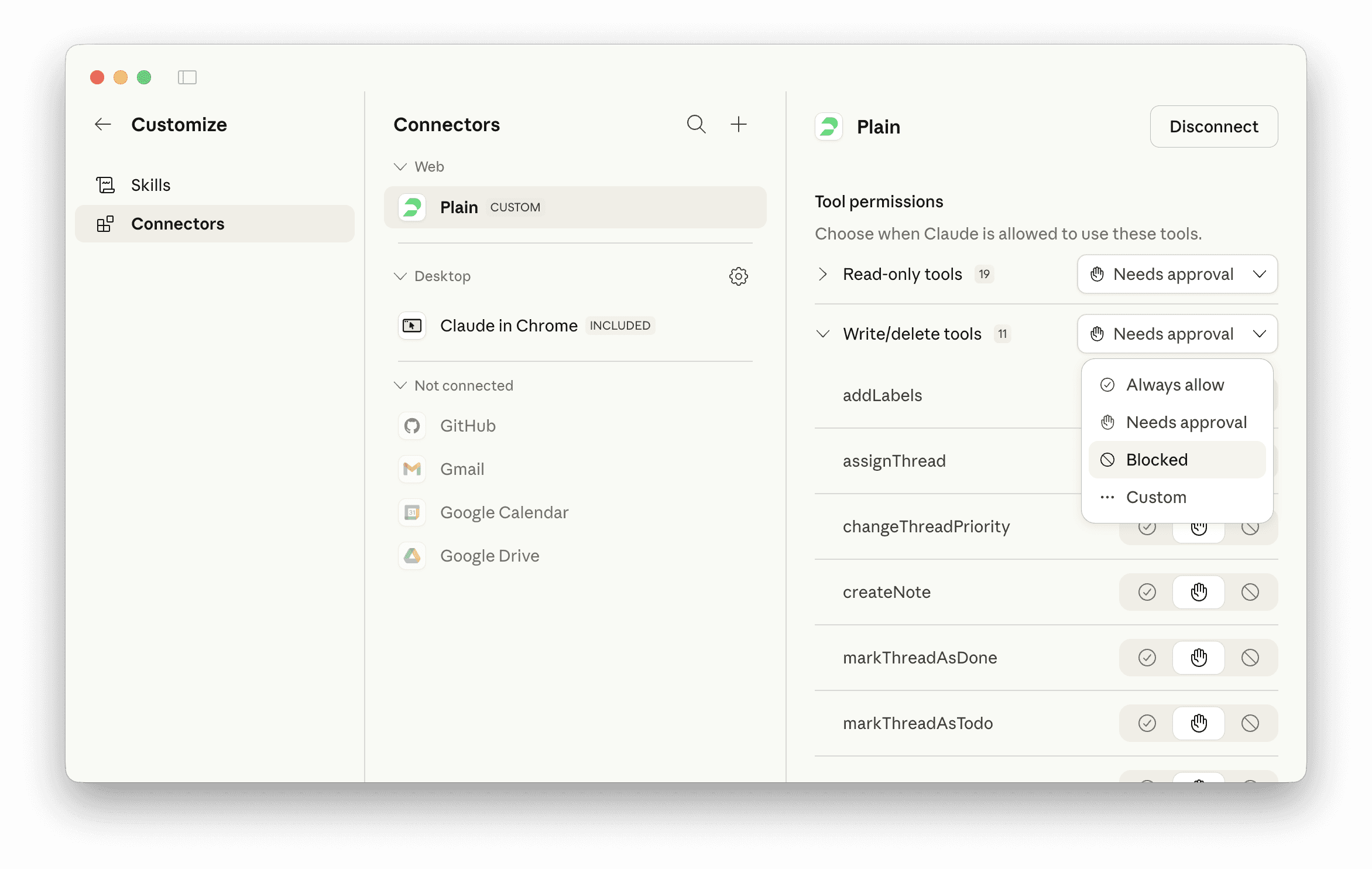
MCP servers require authentication, so the AI can only access systems you've explicitly connected and credentialed. But the more important layer is permissions: each MCP server decides what it exposes. A read-only server might let the AI look up customer accounts but not modify them. A more permissive one might let it send replies or update records.
Most AI tools also have a human-in-the-loop step. When the AI wants to take an action (send a message, close a ticket), it asks you first. You approve or reject. This isn't baked into MCP itself, it's up to the AI tool, so it's worth checking how your tool handles it.
The tradeoff is straightforward: MCP makes AI more capable, which means a misconfigured server can do more damage. If you give an AI write access to your support platform without review steps, that's a real risk. Start with read-only servers and add write access deliberately.
Where to start
If you want to try MCP on your support team, here's a practical order:
Connect your knowledge base and ticketing platform as read-only. This is low-risk and immediately useful. The AI can look things up but can't change anything.
Add your CRM as read-only. Now the AI can pull in account context alongside ticket data.
Add your bug tracker (GitHub, Linear, etc.). This is where the cross-system value kicks in: the AI can connect customer reports to engineering work.
Only then consider write actions. Sending replies, closing tickets, updating records. Add these one at a time with approval steps.
MCP is early but moving fast. The protocol launched in late 2024 and picked up broadly across major AI platforms within a year. You'll still paste context into AI sometimes. But a lot less.
We also built an MCP server for Plain because we think support tools should work with any AI, not lock you into one vendor's assistant.
You've probably used an AI assistant at work by now. Maybe you've asked it to draft a customer reply, summarize a long thread, or help debug an issue. And you've noticed the gap: it doesn't know anything about your customers, your tickets, or your tools. So you copy-paste context from three different tabs, feed it into the AI, and hope for a useful answer.
MCP is the standard that's emerging to close that gap.
MCP stands for Model Context Protocol. It's an open standard that lets AI tools connect directly to the systems you already use. Your support platform, your CRM, your bug tracker, your knowledge base. Instead of you being the middleman between AI and your tools, MCP lets them talk to each other.
Think of it like USB-C for AI
Remember when every phone had a different charger? You'd open a drawer and find a tangle of cables, none of which fit your current device. USB-C fixed that by giving everything one standard port. It doesn't tell your phone what to do, it just defines how devices talk to each other.
MCP does the same thing for AI. It defines the interface between AI tools and external systems, not the behavior.
Without MCP, every AI tool needs a custom integration with every work app. If you have 5 AI tools and 10 apps you use daily, someone has to build and maintain 50 different connections. That's why most AI tools today work in isolation. The integration cost is too high.
With MCP, each work app builds one MCP server. Each AI tool supports MCP once. Now instead of 50 custom integrations, you need 15. The AI tool doesn't need to know anything specific about your support platform. It just speaks the same protocol.
MCP is an open standard, not owned by any single vendor. As of early 2026, ChatGPT, Gemini CLI, Amazon Q, Claude, GitHub Copilot, and Cursor either ship with MCP support or have well-maintained clients for it (support varies by product and edition). There are others too, but these give you a sense of how broadly it's been picked up.
What MCP lets AI tools do
The two things MCP actually does:
Take actions. The AI can do things on your behalf. Look up a customer, search your knowledge base, create a ticket, post a message. Instead of you going to your CRM to check account details and relaying that to the AI, the AI checks the CRM itself. (This is where you want approval steps before anything gets sent.)
Say a customer asks about their billing. The AI pulls up their account, sees they're on a trial that expires Mar 6, and drafts a response with the right details.
Pull in context. The AI can read from your systems. Ticket history, customer timelines, recent product changes, internal documentation. It sees what's relevant instead of you having to describe it. (This is where you want to think about what fields get redacted.)
You're handling an escalation. The AI reads the full thread history, the customer's previous conversations, and the related bug report, then gives you a summary of where things stand.
MCP also supports reusable prompt templates (like "summarize this thread" or "draft a reply in our voice"), though that's less about the protocol and more about how your AI tool is configured. Most teams get the biggest value from the first two.
What this means if you work in support
No more tab-juggling. Today, answering one customer question might mean checking the support platform, the CRM, the bug tracker, and the knowledge base. With MCP, your AI assistant pulls from all of these in one conversation.
AI agents that actually know your systems. Generic AI assistants give generic answers. An MCP-connected AI agent can check a real customer's actual account, look at their real ticket history, and find the specific knowledge base article that answers their question. The difference between "try clearing your cache" and "I see your account was migrated to the new plan yesterday and your API key needs to be regenerated, here's how" is context.
Your tools start working together. Most support teams run on 5-10 different tools that don't talk to each other well. MCP doesn't replace any of them. It connects them through AI. Your support platform, CRM, bug tracker, and internal docs all become accessible to the same AI assistant.
There are already MCP servers for Slack, GitHub, Linear, Sentry, Notion, Google Drive, databases, and support platforms including Plain. Some are official (maintained by the vendor), some are community-built. Quality and capabilities vary. Most are read-only; fewer offer write actions.
What MCP doesn't do. It doesn't replace your tools. It doesn't mean AI handles tickets autonomously. And it doesn't make bad AI models smarter. MCP just gives AI a way to connect to your systems. What the AI does with that access still depends on the model, the prompts, and the guardrails your team puts in place.
How people actually use MCPs today
You don't need to write code to use MCP.
You pick an AI tool that supports MCP (meaning it has a built-in MCP client that can connect to servers, either natively or through a plugin). ChatGPT, Cursor, Gemini, and dozens of others qualify. Then you tell it which systems to connect to. You're basically saying: "here's my support platform, here's my CRM, here's GitHub."
In most tools, this is a config file. You won't need to write code, but you will see something like this:
{
  "mcpServers": {
    "your-support-platform": { "url": "https://..." },
    "your-crm":              { "url": "https://..." },
    "github":                { "command": "npx", "args": ["@modelcontextprotocol/server-github"]
Each entry points to an MCP server. Some run remotely (a URL), some run locally on your machine (a command). You authenticate with each, and then the AI discovers what it can do. Most of the time you don't have to micromanage what it can do. You just ask questions and it picks the right tools.
Here's what that looks like in practice: a support engineer has three MCP servers configured. Their support platform, their CRM, and GitHub. A customer reports a bug. The AI pulls up the customer's account from the CRM, finds the related GitHub issue, and sees a fix was merged yesterday but hasn't been deployed yet.
The CRM server is slow to respond (it sometimes takes a few seconds for the lookup), and the GitHub server returns a wall of commit history that the AI has to parse down. The company name in the CRM doesn't quite match the one in the support platform, so the AI asks you to confirm it found the right account.
But it gets there. It drafts a response with the deploy timeline and links the customer to the GitHub issue by name.
"Is this safe?"
MCP servers require authentication, so the AI can only access systems you've explicitly connected and credentialed. But the more important layer is permissions: each MCP server decides what it exposes. A read-only server might let the AI look up customer accounts but not modify them. A more permissive one might let it send replies or update records.
Most AI tools also have a human-in-the-loop step. When the AI wants to take an action (send a message, close a ticket), it asks you first. You approve or reject. This isn't baked into MCP itself, it's up to the AI tool, so it's worth checking how your tool handles it.
The tradeoff is straightforward: MCP makes AI more capable, which means a misconfigured server can do more damage. If you give an AI write access to your support platform without review steps, that's a real risk. Start with read-only servers and add write access deliberately.
Where to start
If you want to try MCP on your support team, here's a practical order:
Connect your knowledge base and ticketing platform as read-only. This is low-risk and immediately useful. The AI can look things up but can't change anything.
Add your CRM as read-only. Now the AI can pull in account context alongside ticket data.
Add your bug tracker (GitHub, Linear, etc.). This is where the cross-system value kicks in: the AI can connect customer reports to engineering work.
Only then consider write actions. Sending replies, closing tickets, updating records. Add these one at a time with approval steps.
MCP is early but moving fast. The protocol launched in late 2024 and picked up broadly across major AI platforms within a year. You'll still paste context into AI sometimes. But a lot less.
We also built an MCP server for Plain because we think support tools should work with any AI, not lock you into one vendor's assistant.
You've probably used an AI assistant at work by now. Maybe you've asked it to draft a customer reply, summarize a long thread, or help debug an issue. And you've noticed the gap: it doesn't know anything about your customers, your tickets, or your tools. So you copy-paste context from three different tabs, feed it into the AI, and hope for a useful answer.
MCP is the standard that's emerging to close that gap.
MCP stands for Model Context Protocol. It's an open standard that lets AI tools connect directly to the systems you already use. Your support platform, your CRM, your bug tracker, your knowledge base. Instead of you being the middleman between AI and your tools, MCP lets them talk to each other.
Think of it like USB-C for AI
Remember when every phone had a different charger? You'd open a drawer and find a tangle of cables, none of which fit your current device. USB-C fixed that by giving everything one standard port. It doesn't tell your phone what to do, it just defines how devices talk to each other.
MCP does the same thing for AI. It defines the interface between AI tools and external systems, not the behavior.
Without MCP, every AI tool needs a custom integration with every work app. If you have 5 AI tools and 10 apps you use daily, someone has to build and maintain 50 different connections. That's why most AI tools today work in isolation. The integration cost is too high.
With MCP, each work app builds one MCP server. Each AI tool supports MCP once. Now instead of 50 custom integrations, you need 15. The AI tool doesn't need to know anything specific about your support platform. It just speaks the same protocol.
MCP is an open standard, not owned by any single vendor. As of early 2026, ChatGPT, Gemini CLI, Amazon Q, Claude, GitHub Copilot, and Cursor either ship with MCP support or have well-maintained clients for it (support varies by product and edition). There are others too, but these give you a sense of how broadly it's been picked up.
What MCP lets AI tools do
The two things MCP actually does:
Take actions. The AI can do things on your behalf. Look up a customer, search your knowledge base, create a ticket, post a message. Instead of you going to your CRM to check account details and relaying that to the AI, the AI checks the CRM itself. (This is where you want approval steps before anything gets sent.)
Say a customer asks about their billing. The AI pulls up their account, sees they're on a trial that expires Mar 6, and drafts a response with the right details.
Pull in context. The AI can read from your systems. Ticket history, customer timelines, recent product changes, internal documentation. It sees what's relevant instead of you having to describe it. (This is where you want to think about what fields get redacted.)
You're handling an escalation. The AI reads the full thread history, the customer's previous conversations, and the related bug report, then gives you a summary of where things stand.
MCP also supports reusable prompt templates (like "summarize this thread" or "draft a reply in our voice"), though that's less about the protocol and more about how your AI tool is configured. Most teams get the biggest value from the first two.
What this means if you work in support
No more tab-juggling. Today, answering one customer question might mean checking the support platform, the CRM, the bug tracker, and the knowledge base. With MCP, your AI assistant pulls from all of these in one conversation.
AI agents that actually know your systems. Generic AI assistants give generic answers. An MCP-connected AI agent can check a real customer's actual account, look at their real ticket history, and find the specific knowledge base article that answers their question. The difference between "try clearing your cache" and "I see your account was migrated to the new plan yesterday and your API key needs to be regenerated, here's how" is context.
Your tools start working together. Most support teams run on 5-10 different tools that don't talk to each other well. MCP doesn't replace any of them. It connects them through AI. Your support platform, CRM, bug tracker, and internal docs all become accessible to the same AI assistant.
There are already MCP servers for Slack, GitHub, Linear, Sentry, Notion, Google Drive, databases, and support platforms including Plain. Some are official (maintained by the vendor), some are community-built. Quality and capabilities vary. Most are read-only; fewer offer write actions.
What MCP doesn't do. It doesn't replace your tools. It doesn't mean AI handles tickets autonomously. And it doesn't make bad AI models smarter. MCP just gives AI a way to connect to your systems. What the AI does with that access still depends on the model, the prompts, and the guardrails your team puts in place.
How people actually use MCPs today
You don't need to write code to use MCP.
You pick an AI tool that supports MCP (meaning it has a built-in MCP client that can connect to servers, either natively or through a plugin). ChatGPT, Cursor, Gemini, and dozens of others qualify. Then you tell it which systems to connect to. You're basically saying: "here's my support platform, here's my CRM, here's GitHub."
In most tools, this is a config file. You won't need to write code, but you will see something like this:
{
  "mcpServers": {
    "your-support-platform": { "url": "https://..." },
    "your-crm":              { "url": "https://..." },
    "github":                { "command": "npx", "args": ["@modelcontextprotocol/server-github"]
Each entry points to an MCP server. Some run remotely (a URL), some run locally on your machine (a command). You authenticate with each, and then the AI discovers what it can do. Most of the time you don't have to micromanage what it can do. You just ask questions and it picks the right tools.
Here's what that looks like in practice: a support engineer has three MCP servers configured. Their support platform, their CRM, and GitHub. A customer reports a bug. The AI pulls up the customer's account from the CRM, finds the related GitHub issue, and sees a fix was merged yesterday but hasn't been deployed yet.
The CRM server is slow to respond (it sometimes takes a few seconds for the lookup), and the GitHub server returns a wall of commit history that the AI has to parse down. The company name in the CRM doesn't quite match the one in the support platform, so the AI asks you to confirm it found the right account.
But it gets there. It drafts a response with the deploy timeline and links the customer to the GitHub issue by name.
"Is this safe?"
MCP servers require authentication, so the AI can only access systems you've explicitly connected and credentialed. But the more important layer is permissions: each MCP server decides what it exposes. A read-only server might let the AI look up customer accounts but not modify them. A more permissive one might let it send replies or update records.
Most AI tools also have a human-in-the-loop step. When the AI wants to take an action (send a message, close a ticket), it asks you first. You approve or reject. This isn't baked into MCP itself, it's up to the AI tool, so it's worth checking how your tool handles it.
The tradeoff is straightforward: MCP makes AI more capable, which means a misconfigured server can do more damage. If you give an AI write access to your support platform without review steps, that's a real risk. Start with read-only servers and add write access deliberately.
Where to start
If you want to try MCP on your support team, here's a practical order:
Connect your knowledge base and ticketing platform as read-only. This is low-risk and immediately useful. The AI can look things up but can't change anything.
Add your CRM as read-only. Now the AI can pull in account context alongside ticket data.
Add your bug tracker (GitHub, Linear, etc.). This is where the cross-system value kicks in: the AI can connect customer reports to engineering work.
Only then consider write actions. Sending replies, closing tickets, updating records. Add these one at a time with approval steps.
MCP is early but moving fast. The protocol launched in late 2024 and picked up broadly across major AI platforms within a year. You'll still paste context into AI sometimes. But a lot less.
We also built an MCP server for Plain because we think support tools should work with any AI, not lock you into one vendor's assistant.